Meeting notes often turn into a mess. You try to listen carefully, understand the discussion, and write important points at the same time. After the meeting ends, you still have to everything, send follow-ups, and remember action items. This process wastes time and increases stress.
Table of Contents
6 Best Free AI Meeting Assistants for 2026
Best Free AI Meeting Assistants in 2026 (Tested & Compared) automatically record meetings, create accurate transcripts, generate summaries, and even list action items. Many tools also offer AI Tools for Chatting chat so you can ask questions later without replaying the entire meeting.
After testing multiple tools, I shortlisted the 9 best free AI meeting assistants that actually deliver value without forcing you to upgrade immediately.
| Meeting Assistant App | Transcription Accuracy | Auto-Generated Summary | AI Chat (Free) | Free Plan Limits | Best For |
|---|---|---|---|---|---|
| Otter AI | High | Yes (Overview, Action Items) | Yes | 300 mins transcription/month3 audio/video imports (lifetime)20 AI chats per user | User-friendly interface and quick AI chat |
| Krisp | High | Yes (Key Notes, Outline, Action Items) | No | 7-day free trial with full paid features | Noise-free meetings and accent clarity |
| Notta | High | Yes (Detailed Summary, Chapters, Action Items, Mind Maps) | No | 50 file uploads/month120 transcription mins/month10 AI summaries/month | Domain-specific structured documentation |
| Fireflies AI | High to Moderate | Yes (Overview, Action Items, Notes) | Yes | Limited transcriptionLimited AI summaries800 mins storage per seat | Sentiment analysis and meeting insights |
| Tactiq.io | Moderate | Yes (Quick Summary, Speaker-wise Action Items) | No | 10 transcriptions/month5 AI credits/month | Chrome-based real-time transcription |
| Sonnet AI | Moderate to Low | Yes (Overview, Key Topics, Questions, Action Items, Takeaways) | No | 5 recordings/month3 insights per call2-month storage | MacBook users needing structured notes |
How I Selected the Best AI Meeting Assistants
best free AI meeting assistants, apps are everywhere now, but not all of them are useful. I focused mainly on free plans, because a good tool should prove its value before asking for money.
Each app was tested on these factors:
- Core features available in the free version
- Transcription accuracy and clarity
- Support for different accents and languages
- AI-powered summaries and action items
- Ease of setup and daily use
- Collaboration and integrations
- Privacy, security, and bot-free options
1. Otter AI
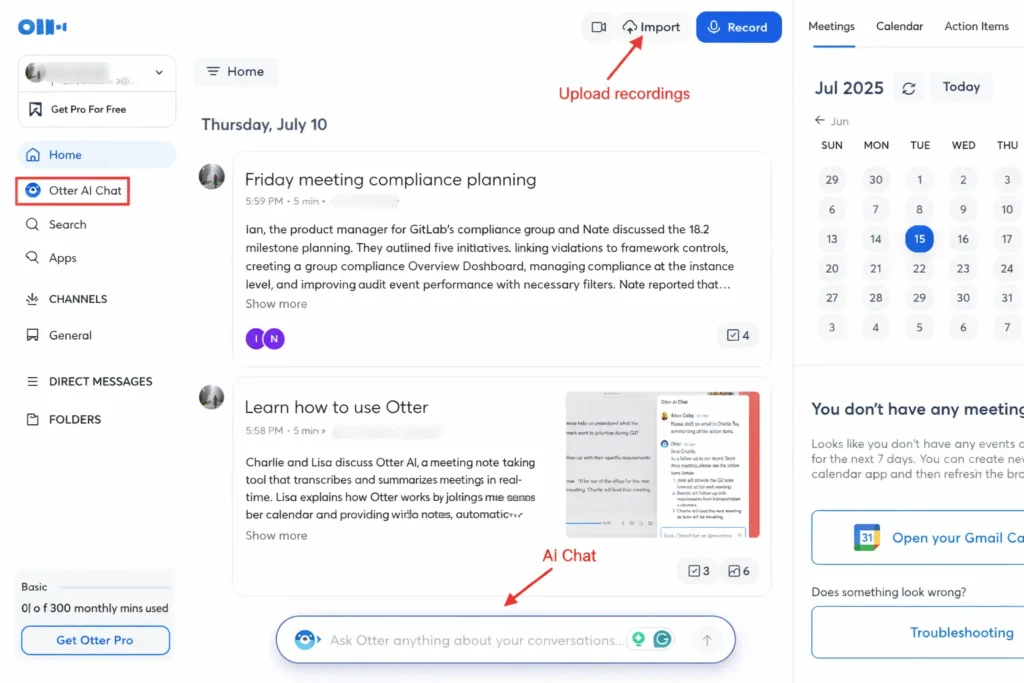
Otter AI is one of the best free AI meeting assistants for 2026, and for good reason. It works smoothly for live meetings and uploaded recordings. The real-time transcription is fast and reliable, especially for one-on-one or small group meetings.
| Feature | Details |
|---|---|
| Rating | G2 Review – 4.4 / 5 |
| Supported Import File Types | AAC, MP3, M4A, WAV, WMA, MOV, MPEG, MP4, WMV |
| Maximum File Size | Not mentioned |
| Integrations Available | Slack, HubSpot, Microsoft Teams |
Otter’s AI meeting agent, OtterPilot, automatically joins meetings, records conversations, and prepares summaries. The free plan also includes AI chat, which is very rare. You can ask questions like “What were the key decisions?” or “Create a follow-up email,” and get instant answers.
Best for:
Educators, job seekers, consultants, and anyone who wants simple and reliable meeting notes.
Pricing
Otter AI offers a practical pricing structure that suits both individual users and small teams. The free plan is generous enough for basic meeting needs and includes:
- 300 minutes of transcription per month
- A 30-minute limit per conversation
- 3 audio or video file imports (lifetime limit)
- 20 AI chat interactions per user
- Access to core transcription and note-taking features
Limitations
While Otter AI is reliable, there are a few drawbacks to consider:
- The user interface feels outdated compared to newer AI tools
- The free plan allows only 3 file imports for a lifetime
- AI transcription supports only English, French, and Spanish
2. Krisp – Best for Noise Cancellation & Accent Conversion
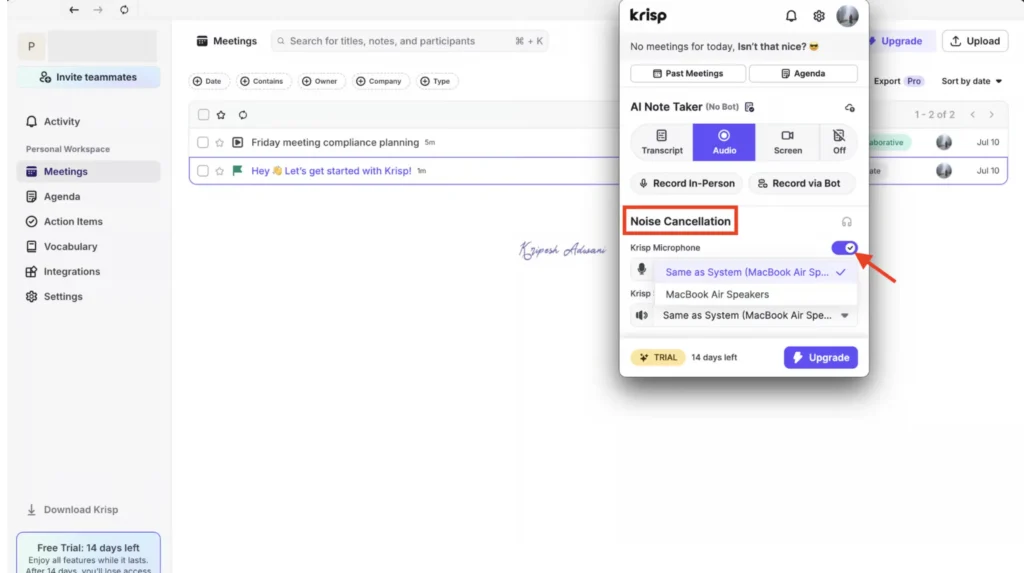
Krisp is mainly known for its powerful noise cancellation, but its AI meeting notes are also excellent. It removes background noise in real time, making your voice clear even in noisy environments.
| Feature | Details |
|---|---|
| Rating | G2 Review – 4.7 / 5 |
| Supported Import File Types | MP3, M4A, WAV, WMA, MOV, MPEG, MP4, WMV |
| Maximum File Size | 1 GB |
| Integrations Available | Slack, HubSpot, Microsoft Teams |
One unique feature is AI accent conversion, which helps non-native English speakers sound more natural. This is extremely helpful for Indian, African, and Latin American professionals.
Although Krisp is mostly paid, the 7-day free trial gives full access, making it worth testing.
Best for:
Remote workers, customer support teams, and professionals working from noisy locations.
Pricing
Krisp follows a premium-first pricing model but allows users to explore its full capabilities through a 7-day free trial. During the trial period, users get complete access to all Business Plan features, and no credit card is required, making it easy to test the tool without risk.
Key features available during the free trial and Business plan include:
- Unlimited meeting transcription and audio recording
- Unlimited AI-powered noise cancellation
- Up to 4 hours of accent conversion per day
- 30 GB of cloud storage for recordings and notes
- Support for unlimited workspace members
- Advanced collaboration and productivity tools
Limitations
Despite its advanced features, Krisp has a few limitations:
- AI chat is available only on Pro and Business plans
- Accent conversion usage is limited during the free trial
3. Notta – Best for Structured Notes & Mind Maps
Notta stands out for its domain-specific templates and AI-generated mind maps. It is fast, easy to use, and supports many file formats.
| Feature | Details |
|---|---|
| Rating | G2 Review – 4.4 / 5 |
| Supported Import File Types | WAV, MP3, M4A, CAF, AIFF, AVI, RMVB, FLV, MP4, MOV, WMV, WMA, WEBM, 3GP, OGG, MTS |
| Maximum File Size | 1 GB (Audio), 10 GB (Video) |
| Integrations Available | Slack, Google Drive, HubSpot, Microsoft Teams, Salesforce |
The app creates summaries, chapters, and action items automatically. Mind maps are especially useful for complex discussions like product planning or technical meetings.
The free plan has some limits, but it still offers solid value for light users.

Best for:
Corporate teams, researchers, and users who prefer visual summaries.
Pricing
Notta offers a balanced pricing structure that works well for both beginners and regular users. The free plan is suitable for light usage and includes:
- 120 transcription minutes per month
- 50 file uploads per month
- 10 AI-generated summaries per month
- Basic access to meeting transcription features
Limitations
While Notta delivers strong transcription and summarization features, it does have some drawbacks:
- A 3-day trial notification can affect dashboard visibility
- Occasional in-app promotions may interrupt the user experience
- AI Chat is available only on paid plans
- Full transcription visibility is restricted in the free version
4. Fireflies AI – Best for AI Search & Insights
Fireflies AI is powerful when it comes to searching meeting data. You can quickly find keywords, questions, or tasks mentioned during meetings.
| Feature | Details |
|---|---|
| Rating | G2 Review – 4.8 / 5 |
| Supported Import File Types | MP3, M4A, WAV, MP4 |
| Maximum File Size | 100 MB (Video), 200 MB (Audio) |
| Integrations Available | Google Meet, Zoom, Slack, Notion, Google Docs |
It also provides sentiment analysis and speaker talk-time insights, which are helpful for sales and customer success teams. The AI chat assistant, AskFred, allows you to ask questions about past meetings.
The free plan is limited, but good enough for testing its core features.

Best for:
Sales teams, support teams, and client-facing professionals.
Pricing
Fireflies AI offers a free plan that allows users to test its core meeting transcription features, though with some usage restrictions. The free version is suitable for occasional meetings and includes:
- Limited meeting transcriptions
- 800 minutes of storage per seat
- Limited AI-generated summaries
- A 2-hour recording limit per meeting
Limitations
Despite its powerful AI features, Fireflies AI has a few limitations:
- Speaker detection may be inaccurate in multi-speaker meetings
- The website does not clearly explain free plan restrictions
- Low file upload limits (100 MB for video, 200 MB for audio)
- No export option is available in the free version
5. Tactiq – Best Chrome Extension Tool
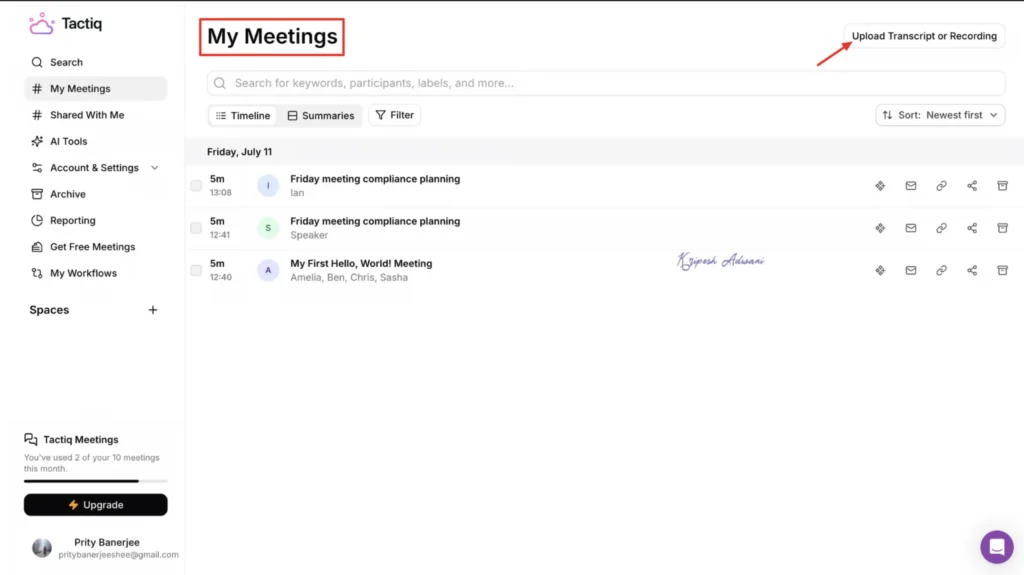
Tactiq works directly inside your browser using a Chrome extension. It offers real-time transcription without bots, which many users prefer for privacy reasons.
| Feature | Details |
|---|---|
| Rating | G2 Review – 4.3 / 5 |
| Supported Import File Types | VTT, TXT, PDF, DOCX, ODT, PPTX, XLSX, ODS, ODP, RTF, M4A, MP3, MP4, MOV |
| Maximum File Size | 2 GB |
| Integrations Available | Google Drive, Notion, Google Meet, HubSpot |
You can export transcripts and summaries easily and even auto-save them to Google Drive or Notion. AI tools help generate summaries and follow-up emails quickly.
Best for:
Chrome users who want fast, bot-free transcription.
Pricing
Tactiq offers a flexible pricing model that works well for individuals who need browser-based meeting transcription. The free plan provides enough features to test the tool and manage light workloads. It includes:
- 10 meeting transcripts per month
- 5 AI credits per month for summaries and action items
- Access to AI Workflow for automating post-meeting tasks
- Integrations with Google Drive, Notion, and Microsoft Teams for easy collaboration
Limitations
While Tactiq is useful, there are some drawbacks to consider:
- Meeting transcriptions may take longer to process
- Speaker detection is not supported
- Monthly AI credits may be insufficient for heavy users
- No mobile or desktop application is available; Chrome extension only
6. Sonnet AI – Best for Mac Users
Sonnet AI is designed only for MacBook users. It focuses on clean, structured meeting notes rather than flashy features.
| Feature | Details |
|---|---|
| Rating | G2 Review – 4.3 / 5 |
| Supported Import File Types | MP3, AAC, M4A, FLAC, WAV, WMA |
| Maximum File Size | 200 MB (Audio) |
| Integrations Available | Slack, Google Meet, Microsoft Teams, Zoom |
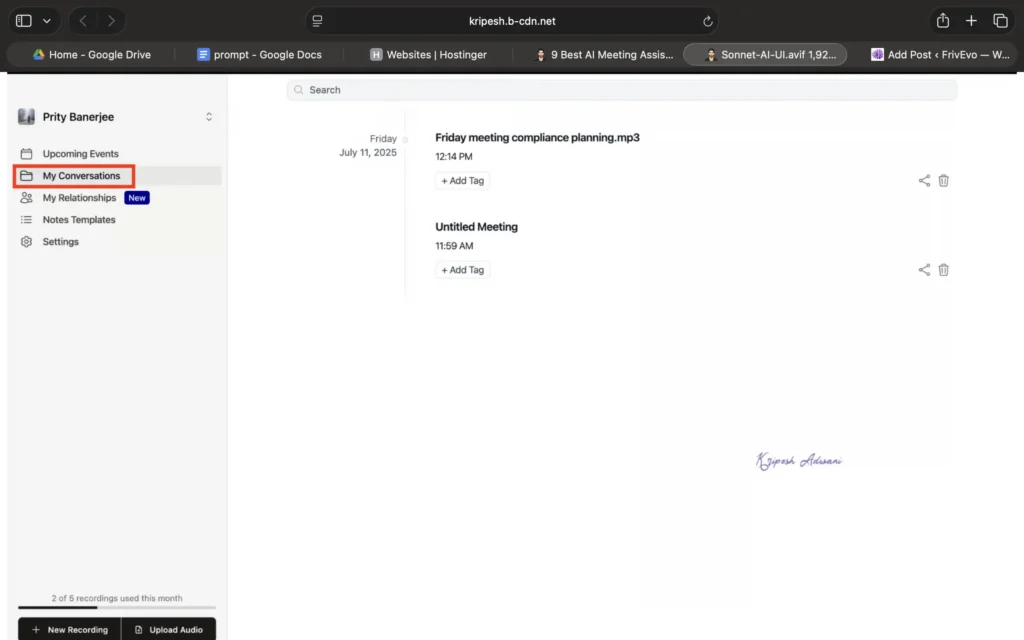
The app organizes notes into clear sections like overview, key topics, questions, and action items. While speaker detection is limited, the note quality is excellent.
Best for:
Mac users, UX researchers, and consultants.
Pricing
Sonnet AI offers a simple and beginner-friendly pricing structure, starting with a free plan that covers essential meeting note-taking needs. The free plan is ideal for light users and includes:
- Up to 5 meeting recordings per month
- A 30-minute limit per recording
- 3 AI insight generations per meeting
- 2 months of cloud storage for saved recordings and notes
For users who need more advanced usage, Sonnet AI provides three paid plans: Plus, Pro, and Enterprise.
Limitations
Despite its strengths, Sonnet AI has a few limitations:
- Available only for MacBook users
- Limited transcription formatting with no speaker identification
- AI notes are restricted to the default structured format
- No support for video meeting uploads
Comparison Table: Best Free AI Meeting Assistants (2026)
| Tool Name | Best For | Free Plan Highlights | Key Limitation |
|---|---|---|---|
| Otter AI | Easy use & AI chat | Live transcription, AI summaries | Limited file imports |
| Krisp | Noise-free meetings | Noise cancel, accent conversion | Mostly paid |
| Notta | Structured notes | Mind maps, templates | Limited free access |
| Fireflies AI | Meeting insights | AI search, summaries | Export limits |
| Tactiq | Browser transcription | Bot-free, exports | Speaker detection |
| Sonnet AI | Mac users | Structured notes | Mac only |
Why AI Meeting Assistants Matter in 2026
Meetings are increasing, not decreasing. Remote work, global teams, and online interviews make it harder to manually track everything. AI meeting assistants remove this burden by handling repetitive tasks automatically.
They help you:
- Focus fully on conversations
- Avoid missed action items
- Save time on follow-ups
- Keep accurate records
Even free AI tools today offer features that were premium just a few years ago.
Final Thoughts
If you want a free and reliable AI meeting assistant, start with Otter AI. If clean audio is your priority, Krisp is unmatched. For structured summaries and visual clarity, Notta is an excellent choice.
The best tool depends on your workflow, device, and meeting style. Try two or three free plans and see which fits naturally into your routine.
AI is no longer optional for meetings in 2026. The right assistant can easily save you hours every week while keeping your notes clear, accurate, and stress-free.